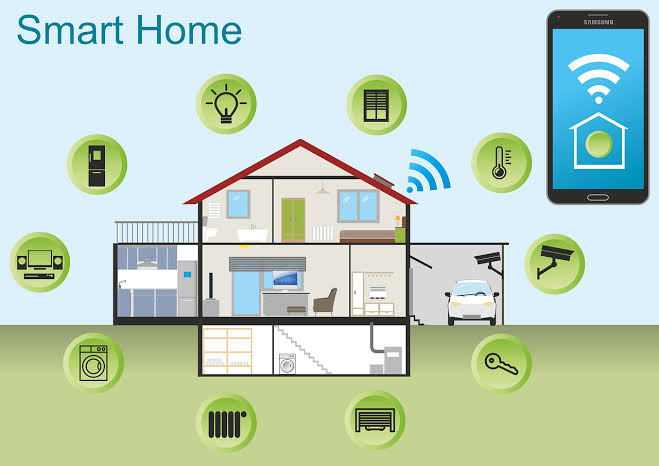

Global smart home adoption crossed roughly 82 percent of connected households in 2026, according to market forecasts from Statista, which means most people now know someone running some version of an automated home, even if they’re not entirely sure how the pieces fit together. The gap between owning a smart bulb and actually having automation is bigger than most people expect.
Most of that automation runs through a home automation hub, the piece that turns a collection of separate gadgets into a system that responds to triggers instead of individual button presses. This guide walks through how that system actually works, piece by piece, and lays out a practical starting point if you’re building one from nothing.
Key Takeaways
- Owning smart devices and having smart home automation aren’t the same thing. Automation means a trigger sets off an action without you pressing anything, and that logic lives in the hub.
- Nearly one in five U.S. households already run six or more connected devices, which is roughly the point where a real hub starts paying for itself over separate apps.
- Locally processed automations typically respond in well under a second, while cloud-routed commands can lag noticeably depending on your internet connection.
- Connected thermostats save an estimated 10 to 23 percent on annual heating and cooling costs, one of the more measurable payoffs of getting automation right.
- Starting small, lighting and plugs first, then sensors and climate, then a full system, avoids the most common beginner mistake: buying incompatible devices before understanding what you actually want automated.
What “Smart Home Automation” Actually Means
A smart device and an automated home are not the same thing. A smart bulb you turn on from an app is still a manual action, just relocated to a phone instead of a switch. Automation means something else: a trigger, like a time of day, a sensor detecting motion, or a phone leaving the house, sets off an action without you doing anything at all.
That distinction matters because it changes what you’re actually shopping for. A handful of standalone smart plugs controlled from separate apps isn’t automation, even though marketing often uses the word loosely. Real automation needs a system that can see the trigger and execute the action, which is the actual job of a home automation hub.
Nearly one in five U.S. households already run six or more connected devices, according to Parks Associates’ tracking, which is roughly the point where switching from separate apps to a real hub starts to pay off.
A mistake people commonly make early on is buying several smart devices, discovering they all live in different apps with no shared logic, and assuming that’s just how smart homes work. It isn’t. That’s the exact gap a hub is built to close.
The Four Pieces Every Home Automation Hub Needs to Tie Together
Every functioning automated home, regardless of brand or budget, is built from the same four pieces.
Devices are the sensors and controllable things themselves: bulbs, locks, thermostats, cameras, plugs. The network and protocols are how those devices talk, over Wi-Fi, Zigbee, Z-Wave, or increasingly Thread and Matter, each with different range, power, and reliability tradeoffs. The hub is the brain that receives trigger data and decides what action to take, whether that’s a basic voice speaker or a dedicated automation controller. The interface is how you, the human, see and adjust the system: an app, a wall panel, or your voice.
Most beginner frustration traces back to one of these four pieces being weaker than the others. A capable hub paired with a spotty Wi-Fi network still produces unreliable automations. A wide device selection with no real hub behind it just produces a pile of apps.
After working on many projects, the network piece is the one people underestimate most. A home automation hub is only as reliable as the connection carrying its commands, and a router tucked in a basement corner will bottleneck an otherwise well-chosen system every time.
How an Automation Actually Runs, Step by Step
It helps to see the mechanics of one real automation, since the concept is more concrete than the marketing usually makes it sound. Take a common example: a “leaving home” routine.
- Trigger: Your phone’s location leaves a defined radius around the house, or you tap a single “away” button.
- Condition check: The hub checks whether anyone else’s phone is still inside that radius, so the house doesn’t lock someone out or shut off lights on someone still home.
- Action sequence: Lights turn off, the thermostat drops a few degrees, door locks engage, and cameras switch to active recording, all within roughly the same second if the hub is processing locally.
That third step is where local versus cloud processing matters in practice. Thread-based automations have shown response latency in the 10 to 18 millisecond range even under network congestion in independent testing, while cloud-routed commands depend on your internet connection and the automation platform’s server response time, which can add a noticeable, sometimes multi-second delay.
In real installations, that lag rarely matters for lighting, but it’s the difference that counts for anything security-related, like a lock responding to a doorbell trigger.
Where to Start: A Practical Rollout Plan
Buying every category of smart device at once is how most beginner setups turn into a pile of unused apps. A phased approach works better.
Phase 1: Lighting and plugs. Cheap, low-risk, and immediately useful. This is also where you’ll get a feel for whichever hub or ecosystem you’re leaning toward before spending more.
Phase 2: Sensors and locks. Motion, door, and window sensors turn a lighting setup into an actual security and convenience layer, and this is usually when a real hub becomes worth the cost over a basic voice assistant.
Phase 3: Climate. A connected thermostat is one of the few upgrades with a directly measurable payoff, an estimated 10 to 23 percent reduction in annual heating and cooling costs according to Department of Energy figures cited by industry market trackers.
Phase 4: Whole-home integration. Multi-room audio, shading, and a unified interface across every room, typically the point where a professional-grade system starts to make more sense than adding another consumer device.
Each phase is also a natural stopping point. Plenty of households are perfectly happy landing after Phase 2 or 3.
What Slows Beginners Down
- Buying devices across three different ecosystems, a voice speaker from one brand, a lock from another, a camera from a third, before checking whether they can actually share triggers with each other.
- Skipping a basic Wi-Fi coverage check, then blaming a device for connectivity issues that are really about signal strength.
- Automating everything at once instead of testing one routine at a time, which makes it hard to tell which step in a chain actually failed.
- Ignoring account and permission settings, leaving every device on a single login with no separate access for guests or family members.
- Assuming voice control and real automation are the same thing, then being surprised when nothing happens automatically without a spoken command.
Signs You’re Ready for a Bigger System
A basic hub setup handles Phases 1 through 3 well for most households. A few signs suggest it’s time to think bigger:
- You’ve hit the practical device ceiling for your current hub, usually somewhere around 15 to 25 devices before lag or missed triggers become noticeable.
- You’re managing a home large enough that Wi-Fi and mesh range genuinely can’t cover it without additional hardware.
- You want lighting, shading, audio, and security to run from a single interface rather than three or four separate apps.
- You live in a co-op, condo, or older building where concealed wiring and board approval make DIY installation impractical.
That last one comes up constantly in dense markets, where home automation services NY buildings actually need typically start with a site survey rather than a shopping list, since concealed wiring, board approvals, and network planning usually turn out to be the bigger job, not the devices themselves.
DIY Starting Point vs. Professional Installation
Nothing about starting with a DIY setup is a mistake. It’s the right entry point for most households, and plenty of homes never need anything more.
DIY makes sense when:
- You’re under roughly 15 devices and comfortable troubleshooting an app occasionally
- Your home’s wiring and Wi-Fi coverage are already solid
- You’re renting or don’t plan to stay long-term
- The goal is convenience, not a fully unified whole-home system
Professional installation makes more sense when:
- You want lighting, shading, security, and audio managed from one interface
- Wiring needs to be concealed or run through walls
- You’re in a building with approval requirements for structured cabling
- You’ve outgrown a consumer hub’s device ceiling and want it solved properly rather than patched
Cost is the honest tradeoff, and it’s a real one. A DIY hub setup for a mid-sized home might run $200 to $600 in hardware total. A professionally designed whole-home system, covering multiple rooms and device categories, more commonly runs from the low thousands into five figures, with installation taking one to three weeks rather than a weekend project.
What a Professional Home Automation Hub Adds Once You Outgrow DIY
The jump from a consumer hub to a professionally designed system isn’t just a bigger version of the same box. It changes what the hub is actually responsible for.
A CEDIA-certified integrator designs the network first, access points placed for actual coverage rather than wherever a router happened to land, then builds the automation logic around lighting scenes, shading schedules, and multi-room audio that a basic voice hub was never built to coordinate. The system also typically includes dedicated keypads and touch panels, so the household isn’t dependent on a phone app for basic daily control.
Nex Av’s smart home automation system in New York approaches this the way most CEDIA-certified integrators do, treating the hub as one piece of a larger design that’s planned around the building and the household from the start rather than assembled device by device after the fact. That upfront planning is usually the difference between a system that still works cleanly three years and a dozen devices later, and one that needs to be rebuilt from scratch.
Final Thoughts
Whatever a home automation hub eventually manages in your home, three lights or an entire building’s lighting, shading, and security, the mechanics underneath stay the same: a trigger, a decision, and an action. Starting small and phasing in sensors, climate, and eventually a unified interface avoids the most common beginner mistakes, and it gives you a real sense of what you actually want automated before committing to a bigger system. For most households, that phased approach is also the fastest way to find out whether DIY is enough, or whether the scope of what you want justifies bringing in a professional from the start.
FAQ
What’s the difference between a smart device and smart home automation?
A smart device just moves manual control to an app or voice command. Automation means a trigger, like a time, sensor, or location, sets off an action without you doing anything, and that logic runs through a hub rather than a single device.
How many smart devices do I need before a hub makes sense?
There’s no strict cutoff, but most people feel the difference somewhere between 5 and 10 devices, when juggling separate apps starts outweighing the convenience of any single one. Below that, a voice assistant alone often covers the basics fine.
Do smart thermostats actually save money, or is that mostly marketing?
Department of Energy data, cited across industry market research, puts typical annual heating and cooling savings from a connected thermostat at 10 to 23 percent, depending on the home and how consistently the schedules are used. It’s one of the more measurable payoffs in home automation.
Can I start with DIY devices and upgrade to a professional system later?
In most cases, yes, though not every consumer device is compatible with professional-grade platforms, so it’s worth checking compatibility before buying heavily into one ecosystem if a bigger system is a future possibility. A professional consultation typically includes that compatibility check as part of the initial assessment.
Is local processing actually necessary, or does cloud-based automation work fine?
Cloud-based automation works fine for lighting and convenience routines, but it depends on your internet connection staying up, and it introduces enough delay to matter for anything security-related. Locally processed automations respond faster and keep working during an internet outage.